
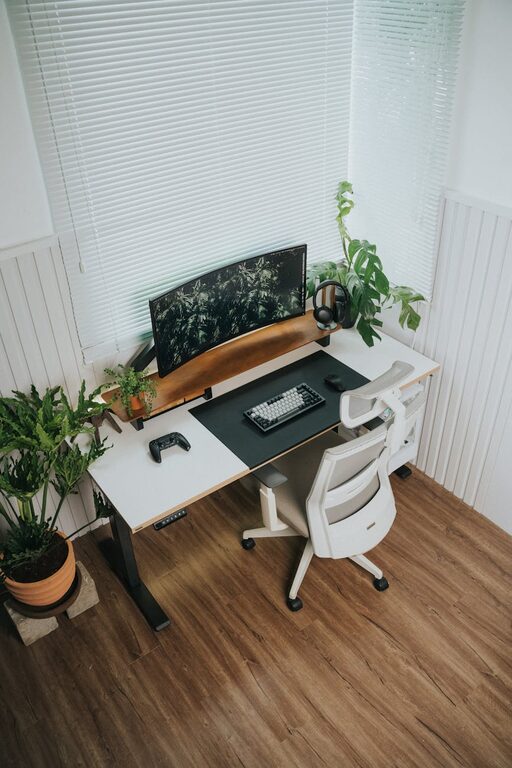
Creating a home workspace that is both relaxing and productive can make a significant difference in your daily routine and overall work satisfaction. Whether you’re working remotely, studying, or managing personal projects, the right environment helps you maintain focus while minimising stress. In this post, we’ll explore practical tips to design a workspace that supports your wellbeing and maximises efficiency.
1. Choose the Right Location
The first step in setting up your workspace is selecting the ideal spot in your home.
– Natural light: Opt for a space near a window to take advantage of natural light. This can improve mood and reduce eye strain.
– Quiet area: Choose a place away from loud noises and distractions, such as family gatherings or busy household areas.
– Adequate space: Ensure you have enough room for your desk, chair, and any equipment you need without feeling cramped.
If space is limited, consider using screens or room dividers to create a dedicated zone for work.
2. Invest in Comfortable Furniture
Comfort is key to maintaining productivity during long hours of work.
– Ergonomic chair: A chair with adjustable height, lumbar support, and good cushioning helps prevent back pain.
– Appropriate desk height: Your desk should allow your arms to rest comfortably at a 90-degree angle while typing or writing.
– Footrest and accessories: If your feet don’t reach the floor naturally, use a footrest. Consider wrist supports and monitor stands to maintain good posture.
Take your time choosing furniture that matches your body and work style to avoid discomfort and fatigue.
3. Organise Your Space Efficiently
A tidy and organised workspace reduces distractions and improves focus.
– Declutter regularly: Remove unnecessary items from your desk to create a clean surface.
– Storage solutions: Use shelves, drawers, or organisers to keep stationery, documents, and gadgets in order.
– Cable management: Keep cords and chargers neatly arranged using clips or cable sleeves to prevent tangles.
Having everything within reach yet organised helps streamline your workflow.
4. Personalise Your Workspace
Adding personal touches can make your workspace more welcoming and motivating.
– Plants: Houseplants improve air quality and create a calming atmosphere.
– Artwork or photos: Decorate with images that inspire or relax you.
– Colours: Use colours that suit your personality and mood. Soft, neutral tones tend to be soothing, while brighter colours may boost energy.
Remember to balance personal items with a clean workspace to avoid clutter.
5. Optimise Lighting
Proper lighting reduces eye strain and keeps you alert.
– Combine natural and artificial light: Use daylight as much as possible, supplemented by lamps with adjustable brightness.
– Task lighting: Position a desk lamp to illuminate work materials without causing glare on screens.
– Screen settings: Adjust monitor brightness and contrast to suit the ambient lighting.
Good lighting supports both relaxation and productivity.
6. Minimise Noise and Interruptions
Creating a quiet environment allows better concentration.
– Noise-cancelling headphones: These can help block out background sounds.
– Soft furnishings: Rugs, curtains, and cushions absorb noise, reducing echo.
– Household routines: Discuss your work hours with family members or housemates to minimise interruptions.
Setting boundaries encourages respect for your working time.
7. Incorporate Movement and Breaks
Sitting for prolonged periods can affect health and focus.
– Regular breaks: Follow the 50/10 rule—work for 50 minutes, then take a 10-minute break.
– Stretching: Incorporate simple stretches or light exercises to relieve tension.
– Standing options: Consider a sit-stand desk or standing breaks to vary your posture.
Movement refreshes both body and mind, enhancing productivity.
8. Manage Technology Wisely
Technology is essential but can also be a source of distraction.
– Essential devices only: Keep only necessary gadgets at your workspace.
– Notifications: Disable non-essential alerts during focused work sessions.
– Battery management: Keep chargers organised and avoid clutter from cables and devices.
Using technology mindfully supports smoother workflow and focus.
9. Keep Hydrated and Nourished
Your brain needs fuel to stay sharp.
– Water: Keep a bottle or glass of water nearby.
– Healthy snacks: Choose nourishing options like nuts or fruit to maintain energy levels.
– Avoid clutter: Use reusable containers to minimise mess in your workspace.
Proper hydration and nutrition contribute to overall wellbeing.
—
Final Thoughts
Designing a home workspace that blends relaxation with productivity is all about balance. By choosing the right location, investing in comfort, organising your area, managing light and noise, and looking after your wellbeing, you create an environment where work feels less like a chore and more like a positive experience. Start with small changes and adapt your space as you discover what works best for you. A mindful approach to your workspace setup can make your work-from-home journey both pleasant and efficient.